
Trash service billing software should take the busywork off your desk so you can run routes instead of chasing money. However, many haulers still go without trash service billing software and bill by hand. They juggle spreadsheets, sticky notes and a phone that rings all day.
That works for a handful of customers. But as you grow, it starts to break. Cards expire, first payments fail, and customers drop for non-payment before you even notice. As a result, you lose money you already earned.
We built GarbagoTech for small and larger established waste service businesses. In this guide, you’ll see what good billing software should do and how GarbagoTech handles each job. We also answer the questions operators ask us most.
What Should Trash Service Billing Software Do?
Trash service billing software should bill every customer on the right schedule, retry failed cards and warn you before anyone drops. It should also let customers pay and manage service online. Finally, it should make price changes simple and send clear invoices without manual work.
For example, look for these features before you sign up:
- Recurring billing for trash pickup on weekly, bi-weekly, monthly and quarterly plans
- Bulk price changes that you can preview first
- Alerts for failed payments and upcoming drops
- A customer portal for trash service on the web and on mobile
- Itemized invoices plus automatic receipts
- Route lists that match the real service day
Some people call it garbage collection billing software. Others say trash pickup billing software. Either way, the job is the same: bill the right amount on the right day, and tell you when something goes wrong.
In short, the right tool replaces your spreadsheet instead of adding one more thing to check.
How Do I Raise Prices for Trash Service Customers Without Losing Them?
Fuel, dump fees and labor go up every year, so your prices have to follow. Still, a price change by hand means editing every account and hoping you don’t miss one. That’s why many owners put it off for far too long.
- Bulk price change: schedule a percentage or dollar increase across your customers in one step.
- Preview first: see the new amounts before anything goes live, then leave specific customers out.
- Fair timing: each customer’s next renewal bills the new price, so no one gets a surprise mid-cycle charge.
- Custom price per property: give special accounts their own rate without a side spreadsheet.
As a result, a yearly increase takes minutes, and you can give customers notice before it starts. You can see our plans on the GarbagoTech pricing page.
How Do I Automate Billing for My Trash Pickup Business?
Billing goes wrong most often at the start. A new customer calls, you take notes, and then you enter the same details in three places. Meanwhile, the first bill goes out late or not at all.
- Customer Setup Wizard: add the customer, property, service and payment in one flow.
- Your start date: choose when billing begins, so the first charge lines up with the first pickup.
- Pick up where you left off: if a call cuts you short, resume the unfinished setup later.
- Trash day at approval: set the weekly trash day while you approve a customer’s online signup.
Once setup is done, recurring billing for trash pickup runs on its own. In other words, every new account starts clean and bills on time.
How Can I Reduce Failed Payments on Trash Service Subscriptions?
A failed card is not a lost customer yet. However, it becomes one if nobody follows up. Many operators find out too late, when the cans stop going out and the account is already gone.
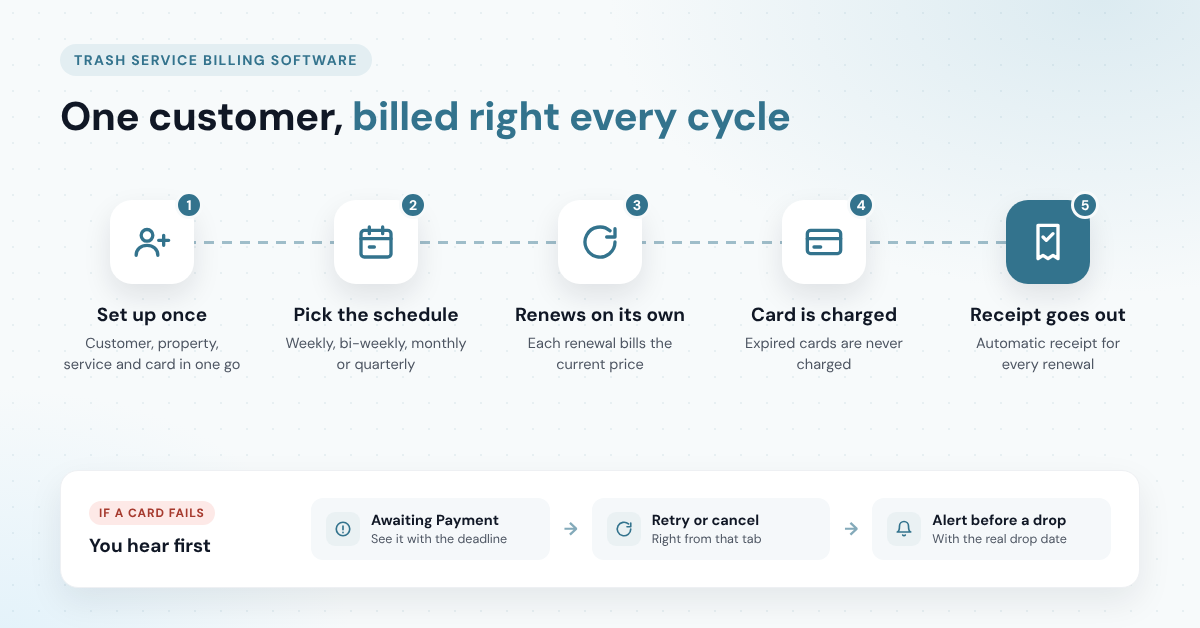
- Awaiting Payment tab: see approved subscriptions whose first charge failed, along with the deadline. Then retry the charge or cancel.
- Customer payment alerts: get a warning before a customer drops for non-payment, with the real drop date. Quiet hours and an optional daily digest keep alerts from taking over your evening.
- Payment-health indicator: scan your customer list and spot each customer’s soonest overdue deadline at a glance.
- Canceled Subscriptions tab: every cancellation needs a reason, so you can see why customers leave and fix the pattern.
Because you see trouble early, you can make one friendly call instead of trying to win a customer back later.
Trash Service Billing Software That Sends Bills Customers Trust
A confusing bill leads to a phone call, and sometimes to a dispute. Customers want to know what they paid for and when. So your invoices should answer that before they have to ask.
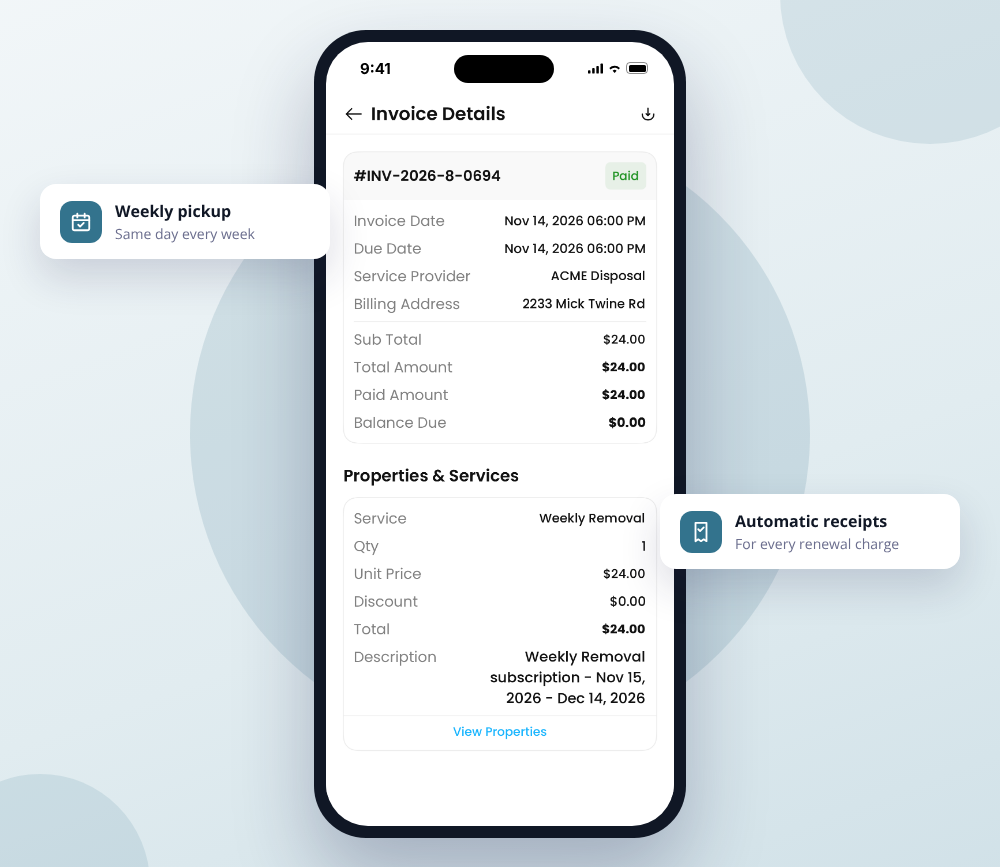
- One line per service: each invoice line shows the service, billing frequency and period.
- Automatic receipts: customers get a receipt for every card charge made while they aren’t present, such as renewals and retries.
- Smart card handling: GarbagoTech never charges an expired card. Also, a reissued card replaces the old one instead of creating a duplicate.
- Clear quotes: quotes show each billing period’s amount up front.
With good trash service billing software, clear bills mean fewer calls and fewer chargebacks.
Can Customers Pay and Manage Their Trash Service Online?
Yes. Customers want to handle simple changes on their own time, not during your route. GarbagoTech gives them a customer portal for trash service on your website and in the iOS and Android apps.
- Update a card: customers can change a saved card’s expiry date without typing the whole card again.
- Pay with a new card: customers can pay an invoice with a different card. Before it goes through, they see any overdue charges and agree to them.
For more on the customer side, read our post on the benefits of a trash pickup customer portal.
How Do I Set Trash Pickup Days for Bi-Weekly, Monthly or Quarterly Service?
Not every customer needs weekly pickup. That’s why GarbagoTech offers bi-weekly and quarterly service options. For monthly service, you can also set a weekday pattern, such as “2nd Friday of each billing month.”
Routes That Hold Up as You Grow
Billing and routes need to agree. When they don’t, crews miss stops and customers pay for service they didn’t see. That hurts trust fast.
- Big routes: you can reorder routes with more than 200 stops, and GarbagoTech joins stops at the same location for you.
- Local calendar days: GarbagoTech schedules services on the customer’s local calendar day, so route lists match the real day.
To go deeper on this topic, see our guide to route planning for can-to-curb businesses.
Who Our Trash Service Billing Software Is Built For
Americans throw away a lot of trash, and the EPA’s national facts and figures on waste show just how much. GarbagoTech fits each of these models:
- Valet trash: doorstep pickup at apartments runs on monthly contracts. Valet trash billing software keeps each property’s rate and schedule straight.
- Curbside trash pickup: weekly and bi-weekly routes depend on recurring billing for trash pickup that runs without reminders.
- Trash can cleaning: monthly and quarterly plans fit well. As a result, trash can cleaning business software has to handle odd schedules with ease.
- Junk hauling: quotes show the amount up front, and receipts go out on their own.
- Roll-off dumpster rental: custom prices per property help you bill fairly for each site.
Many owners also run two or three of these lines at once. For example, a can cleaning company might add valet trash at a new apartment complex. In that case, one invoice line per service keeps each charge easy to read on a single bill. That matters for any waste hauling billing software you consider.
Whatever you haul, the goal is the same: get paid on time with less effort.
Frequently Asked Questions About Trash Service Billing Software
How do I automate billing for my trash pickup business?
Start with trash service billing software that bills on a recurring schedule. In GarbagoTech, the Customer Setup Wizard adds the customer, property, service and payment in one flow. You choose when billing starts. After that, renewals charge on their own, and customers get a receipt for every charge.
How do I raise prices for trash service customers without losing them?
Give notice, keep the increase fair and avoid billing mistakes. With a bulk price change, you schedule a percentage or dollar increase, preview it and leave specific customers out. Each customer then pays the new price at their next renewal, so nobody gets a surprise charge mid-cycle.
How can I reduce failed payments on trash service subscriptions?
Catch problems early. GarbagoTech lists approved subscriptions whose first charge failed, with the deadline, so you can retry or cancel. It also warns you before a customer drops for non-payment. In addition, it never charges an expired card, and a reissued card replaces the old one.
Can customers pay and manage their trash service online?
Yes. With a customer portal for trash service, customers can pay and manage their account on your website or in the iOS and Android apps. They can update a saved card’s expiry date. They can also pay an invoice with a new card after they review and agree to any overdue charges.
How do I set trash pickup days for bi-weekly, monthly or quarterly service?
Pick the plan that matches the customer. GarbagoTech supports bi-weekly and quarterly service. For monthly service, you can set a weekday pattern, such as the 2nd Friday of each billing month. You can also set the weekly trash day while you approve a new signup.
What features should trash service billing software have?
Look for recurring billing, bulk price changes and failed-payment alerts. You also want a customer portal, clear invoices and automatic receipts. Valet trash billing software and trash can cleaning business software also need flexible schedules. Finally, make sure billing and routes use the same service day.
Ready to Try Trash Service Billing Software Built for Haulers?
You started your business to serve customers, not to chase cards. So let GarbagoTech handle billing, payments and schedules while you grow. Book a GarbagoTech demo and see how it fits your routes.